Now available for iOS & Android

Know which machines and members
are going quiet.

A QR sticker on every machine, a free app your members keep, and a monthly floor report for you. No hardware, set up in one afternoon.

dashboard.liftd.ai
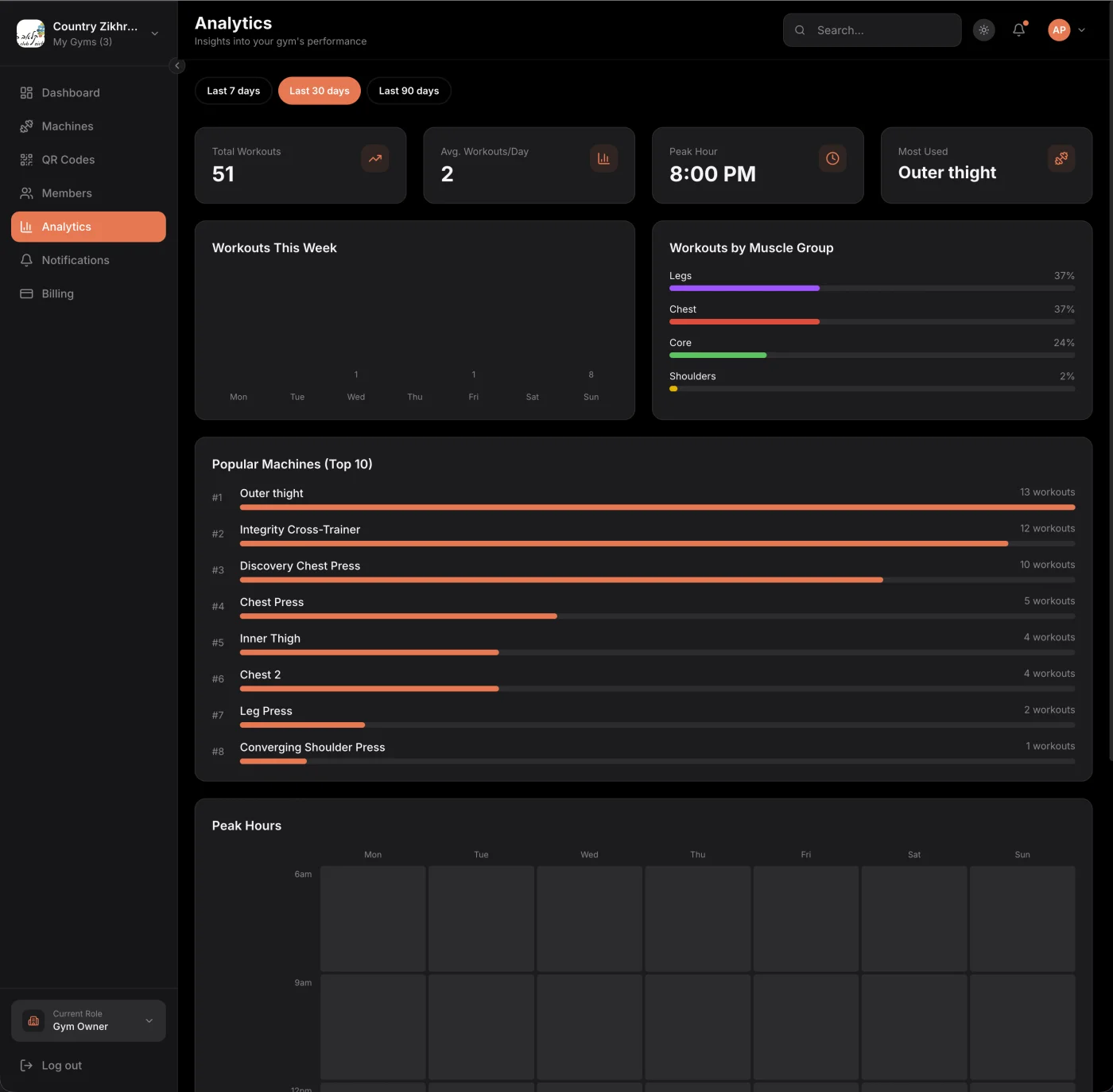
Liftd floor report showing workouts over time, popular machines and the peak-hours heatmap
How it works

Set up in one afternoon

Three steps, and the third one repeats every month.

  1. 1

    Print the stickers

    Add your machines from the catalog, print a QR code for each, stick them on. One afternoon, no hardware.

    Dashboard → Machines → QR codes

  2. 2

    Members scan to log

    A scan opens the right machine, suggests a weight, and logs the set in about three seconds. The app is free and theirs to keep.

    Liftd app, iOS and Android

  3. 3

    Read the floor report

    Every month: which machines nobody touched, which members went quiet, and when your floor is busiest.

    Dashboard → Floor report

dashboard.liftd.ai
Liftd gym analytics dashboard showing workout trends, muscle group distribution, popular machines ranking, and peak hours heatmap
The floor report

What the report shows

Four things a door-swipe system cannot tell you, computed from the scans on your floor.

Machine utilization

Every scan is a data point. See which machines carry the floor and which ones only collect dust.

Peak hours

A day-by-hour heatmap of when members actually train, built from scans rather than door swipes.

Quiet machines

Machines with no logged sets in the last 30 days. Broken, badly placed, or ready to replace.

Quiet members

Members whose last workout was more than 14 days ago, so you can call before they cancel.

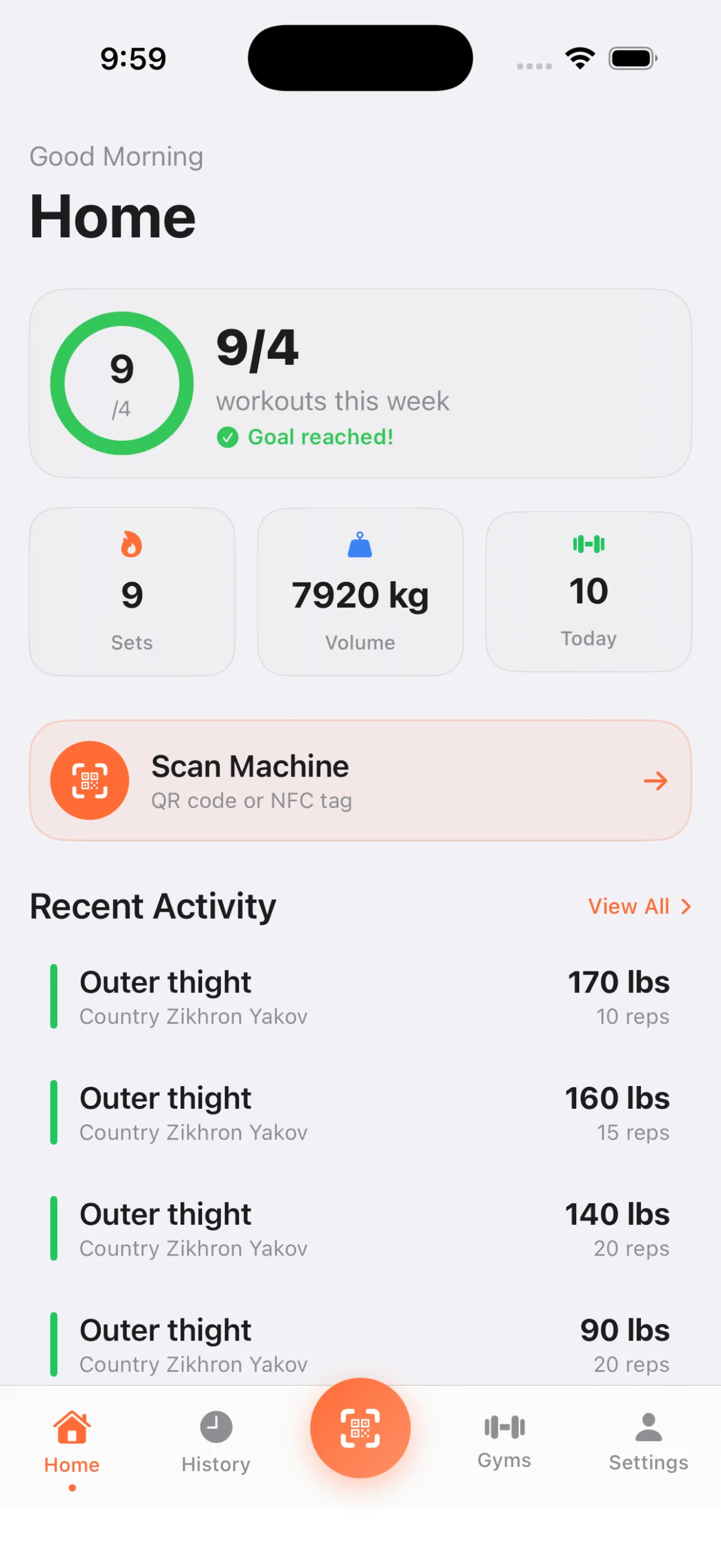
Liftd app home screen with workout stats, scan button, and recent activity
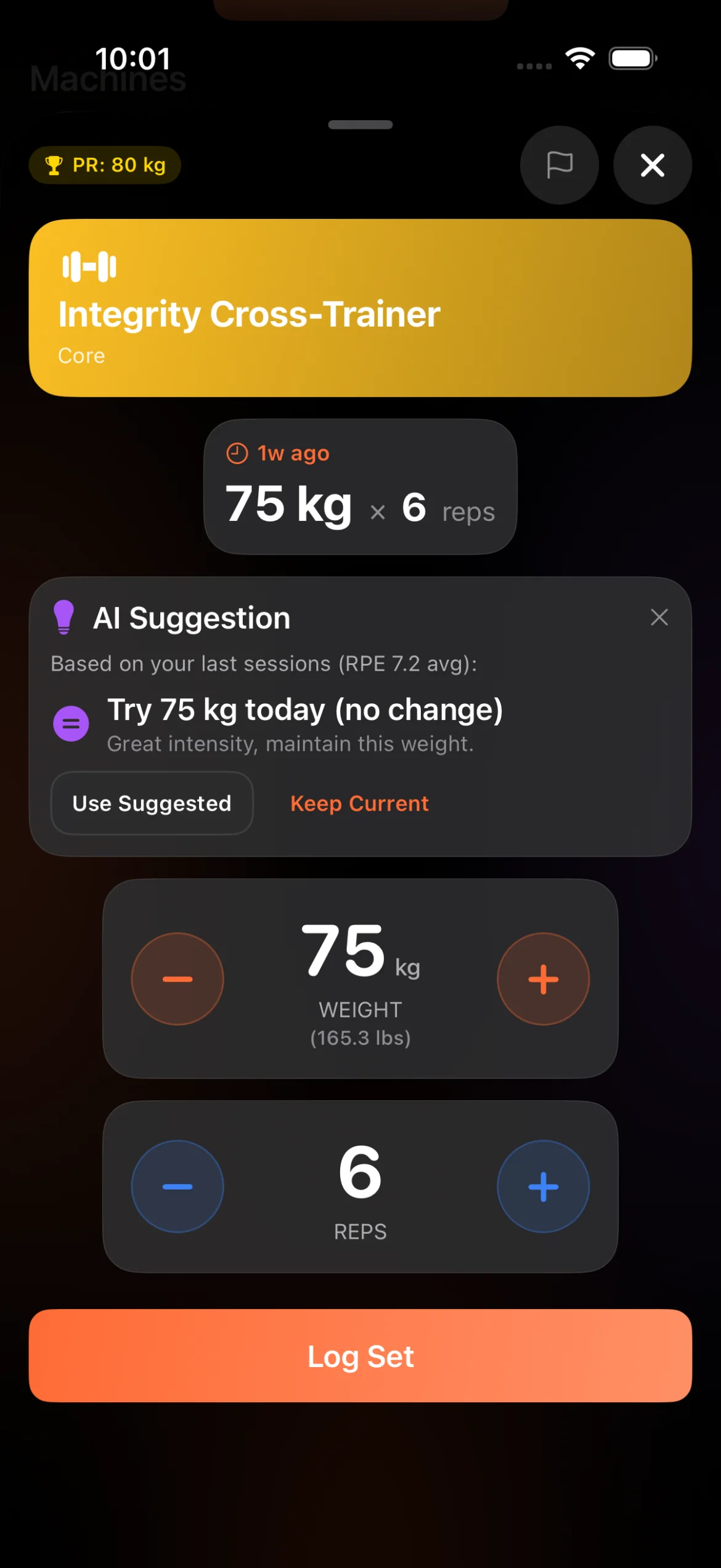
Dark mode workout logging with AI suggestion, weight and reps selector, and log set button

Workout complete!

Bench Press - 4 sets

For Members

3 seconds to log a workout

Other apps require searching exercises, selecting equipment, entering data. With Liftd, members scan a QR code and the machine is recognized instantly. That's why they actually use it—and keep coming back.

  • Scan QR code → Machine recognized instantly
  • Personal records celebrated automatically
  • Progress visible from day one
  • AI recommendations so beginners never feel lost
See member features
App Preview

Beautiful, intuitive interface

Every screen is designed for speed and simplicity. Here's what your members will love.

Liftd home screen showing weekly workout goal ring, stats for sets, volume and today's workouts, scan machine button, and recent activity feed
Home
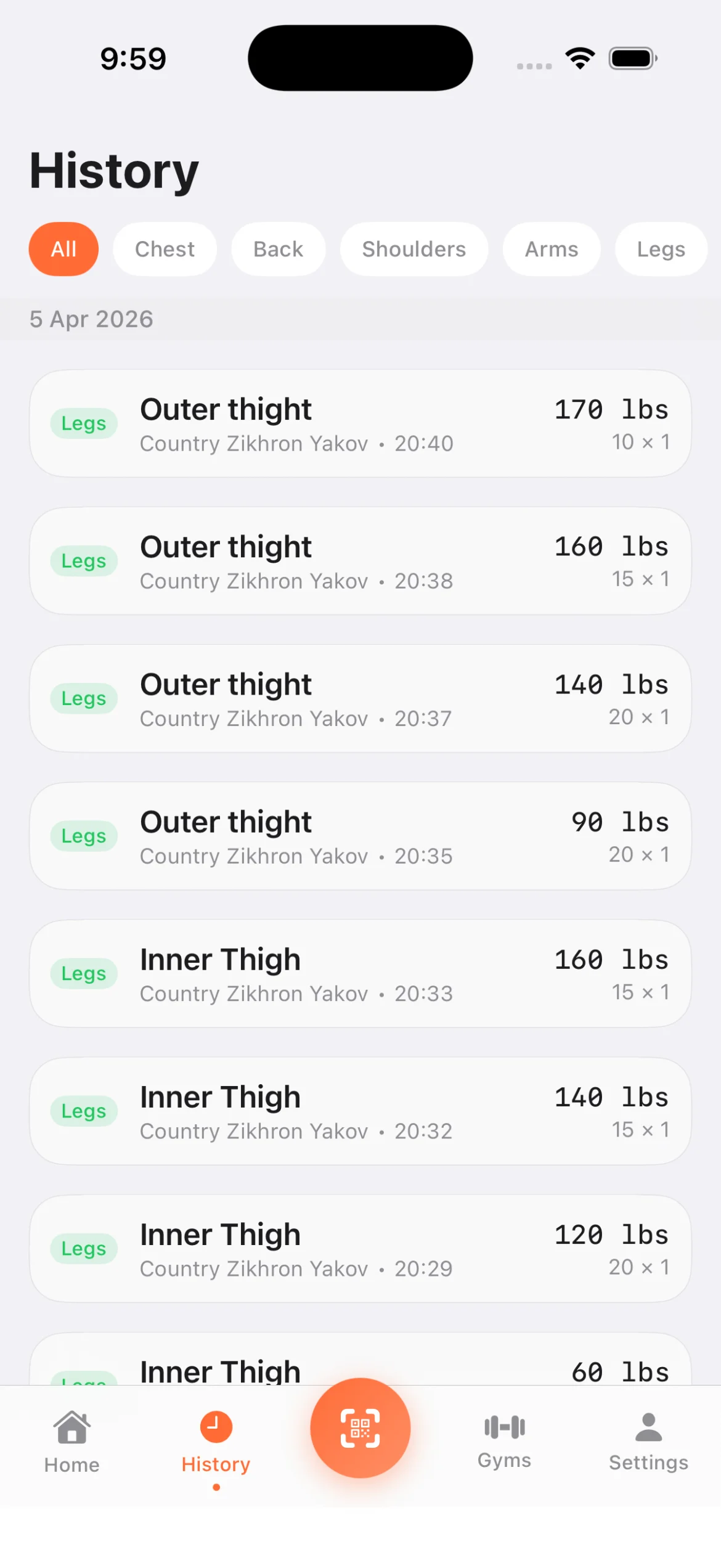
Workout history screen with muscle group filter tabs showing logged sets with weights, reps, gym name and timestamps
History
Gym detail view showing gym logo, address, owner badge, manage gym button, and list of machines organized by muscle group
Gym Details
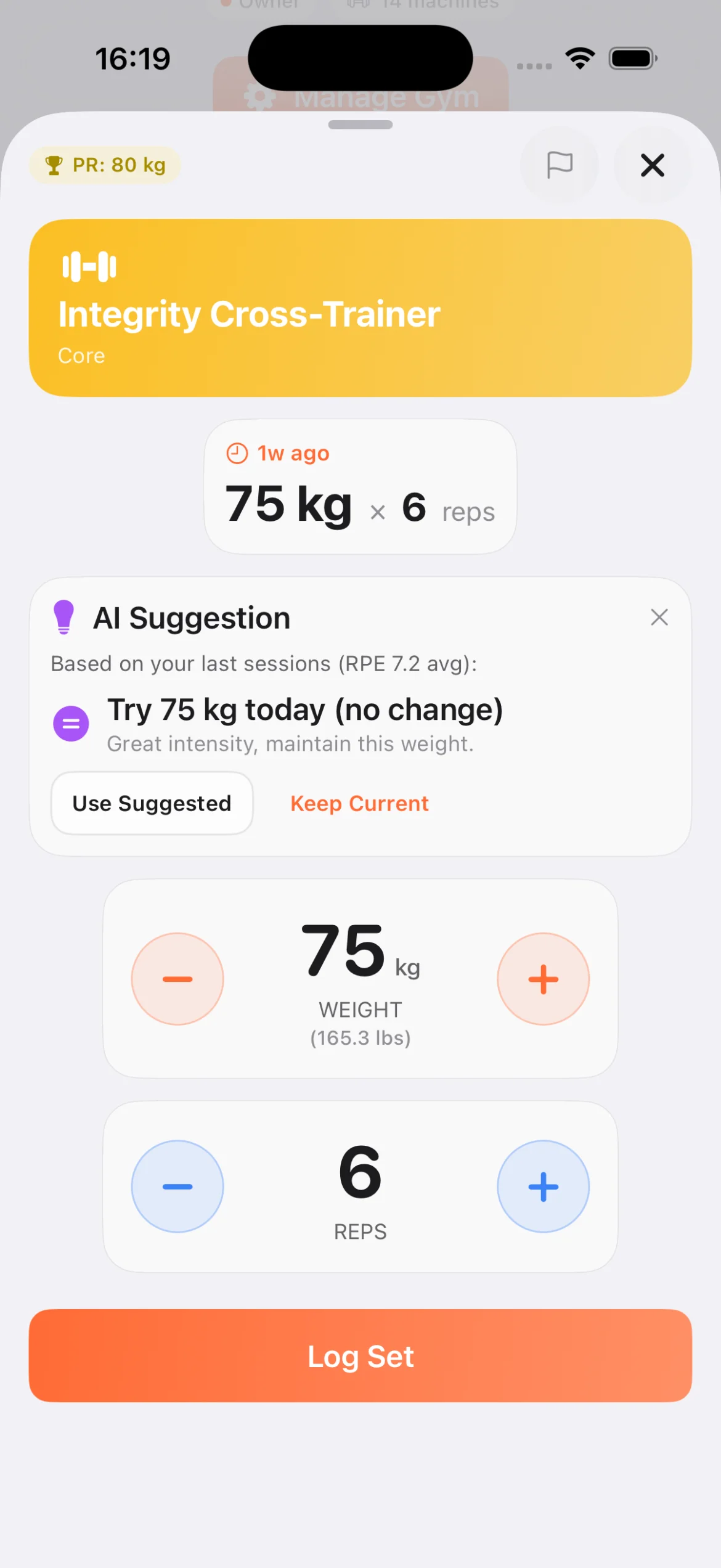
Workout logging screen with machine name, PR badge, last workout, AI weight suggestion based on RPE, weight and reps selectors, and log set button
Workout Log
Rest timer countdown between sets with RPE difficulty rating grid from 1 to 10, plus 30 seconds and skip buttons
Rest Timer
Gym passport showing visited gyms on a world map, stats for total gyms, countries, and travel workouts, with gym cards showing visit count
Gym Passport
Settings screen with language selector, appearance theme toggle, weight unit and measurement system preferences, and legal links for privacy policy and terms of service
Settings
Language picker showing 12 supported languages: English, Hebrew, Spanish, French, German, Russian, Chinese, Portuguese, Hindi, Arabic, Japanese, and Korean with country flags
12 languages
Gym admin dashboard showing member count, machine count, workout stats, and management menu for machines, QR codes, NFC writer, and utilization
Admin
Equipment utilization report showing total workouts, active machines, muscle group distribution chart, and top 5 most popular machines ranking
Utilization
NFC tag writer screen showing machine list with short codes, select a machine then tap phone to NFC tag to write the machine URL
NFC Writer
  • Live on iOS and Android
  • 12 languages
  • 1,424 equipment models in the catalog
  • QR and NFC on any machine
  • AI identifies a machine from a photo
Pricing

Simple, transparent pricing

Priced by the number of machines. Plans are activated by our team after a short call.

Starter

Up to 20 machines

$49/month
  • QR and NFC codes
  • Analytics
  • Floor report
  • Free member app
  • Email support
Most Popular

Growth

Up to 50 machines

$99/month
  • Everything in Starter
  • Larger notification quota
  • Re-engagement notifications
  • Priority support

Pro

Up to 100 machines

$179/month
  • Everything in Growth
  • Multiple locations
  • Monthly report review with us
FAQ

Questions gym owners ask

Straight answers on equipment, setup time, and how we start.

Do I need new equipment?

No. Liftd works with the machines you already have. You add each machine from a catalog of 1,424 models (or name your own), print a QR code, and stick it on the frame. Members scan it with their phone. Gyms that prefer NFC can use tags instead of, or alongside, the codes.

How long does setup take?

One afternoon for most gyms. We set it up with you: you tell us which machines you have, we prepare the codes, and the stickers go on the floor in a single session. The first report arrives after 30 days of scans.

My members already use Hevy or Strong. Does that matter?

They can keep them. Liftd is the app that works with the sticker on your machine, and it is what lets you, the owner, see the floor. Scanning a code is faster than searching an exercise list, which is why members use it in your gym even if they log elsewhere.

How do we start?

Send us a request through the contact page and choose a call back or an email. We walk you through the dashboard, agree a plan, and tag your floor together. There is no self-serve checkout and no trial period: plans are activated by our team.
Ready to see what's really happening in your gym?

Tell us about your gym and how you would like to be reached. We call back or reply by email, whichever you prefer.